Showing posts with label TECHNOLOGY. Show all posts

Sunday, December 8, 2013

One of my favorite app on Apps Store

Here i am. This is one of my favorite apps on Apps Store. This app makes user eyes bigger. You can search on your Apps Store 'bugEye' or 'magic photo lite
It's easy to use. User only take a picture or choose your photos from camera roll then let the apps detecting your face. This app didn't need so long time to detecting maybe only 10-15 second depends on yours quality photos.

Here my picture with big eyes :)

Monday, November 4, 2013

HOW TO DOWNGRADE iOS 7 TO iOS 6

Millions of iPhone, iPad and iPod touch users have been readily updating their firmware to the all-new iOS 7 since it first arrived on September 18th, but much like iOS 6 on the iPhone 3GS, the iPhone 4 struggles to offer the smooth, streamlined experience demanded by iOS 7. For the most part, it’s not particularly problematic, but if you’re rocking 2010′s flagship and would like to revert back to iOS 6, there may be a reprieve around the corner.
As you’ll probably know, you’ll need to have saved your SHSH blobs at some point in the past to make this work. Without it, you’ve no hope and are stuck on iOS 7.
ios6icon
If you’ve stored your iOS 6.1.3/6.1.2 blobs previously for safe-keeping, then check the guide below for a step-by-step to downgrading success. Please note, this guide is for Windows users, and is applicable only on iPhone 4.
Step 1: First up, you’ll need to be running iTunes 11.0.5 or below, so if you’re on a newer version like iTunes 11.1.x, you will need to essentially uninstall it first. This is because starting from iTunes 11.1, Apple has killed the ability to restore to custom firmware files from iTunes. When uninstalling, make sure you remove all traces, including services like Apple Mobile Device, Apple Software Update and Bonjour.
Step 2: After a restart to wash away those traces, download iTunes 11.0.5 from OldApps, or any similar such site [direct link]. Install it, and if you encounter an error relating to "iTunes Music Library.xml", head over to your iTunes Music folder and delete said file.
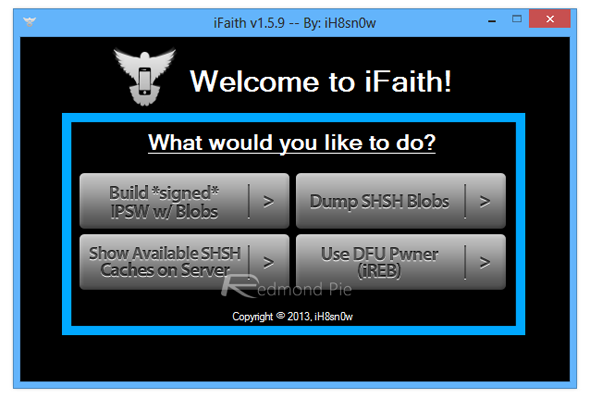
Step 3: Grab the latest version of iFaith (here), and also download iOS 6.1.3 or download iOS 6.1.2 firmware for iPhone 4, depending on which firmware you have saved blobs for to downgrade to. You will also need to retrieve your SHSH blobs from wherever you have happened to save them locally. If you previously had them saved on Cydia, you can make use of “Show Available SHSH Caches on Server” option in iFaith to save them on your HDD now.
Step 4: Fire up iFaith, and click "Build "*signed* IPSW w / Blobs". This will begin the process of creating your modified firmware file to which you will be downgrading.
Screenshot (18)
Step 5: Locate your SHSH, and then select the stock iOS firmware file that you downloaded inStep 3 above. iFaith will then work its magic and create a custom IPSW.
Step 6: Follow the on-screen instructions to put your device into pwned DFU mode using iFaith’s built-in DFU Pwner:
  • Hold Power and Home buttons at the same time for 10 seconds
  • Release the Power button whilst continuing to hold Home until the screen is blank.
  • Congratulations, you have successfully entered DFU mode.
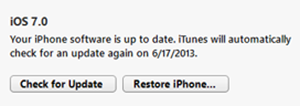
Step 7. Finally, Load up iTunes, select your iPhone, hold down the left SHIFT key and click onRestore iPhone at the same time, and browse to that custom firmware file created by iFaith. The restore will then proceed.
Screenshot-129
Once the restore is complete, your iPhone 4 will be back to iOS 6.x.

(at least i dont have my SHSH, shit happens)

iOS 7 is suck

First, it's important to note that it's different. Really different. Many people don't like change, and similar to most software updates, there are kinks. A new Tumblr account called Sloppy UI has even curated issues from users across the web.
Below, take a look at our biggest complaints about iOS 7 so far:
1. Flat UI
iPhone5S
The user interface has gone completely flat, so apps look a lot less like actual buttons. We miss the subtle depth provided by previous iOS versions that made it seem like we weren't just tapping the screen. Flat is so in these days — for example, Bing and Google just rolled out new, flatter logos.
2. Unnecessary Movements
iOS 7 is more gesture-focused than previous versions, and it's fun taking advantage of features such as "swipe to unlock." But there are many animated movements that border on "disorienting." The main offender here is how apps open and close, by zooming in and out of content via diagonal movement. It looks sleek, but at the same time, it creates a dizzying effect.
3. Parallax Effect
iOS 7
The jittery-nature of the parallax effect on the background will give you vertigo. (For example, if you shift your phone from side to side, it will look like the wallpaper is moving behind the apps). The good news is you can turn this off by selecting "reduce motion" in Settings > General > Accessibility > Reduce Motion.
4. Spotlight vs. Notifications
If you want to do an internal search (the Spotlight feature), swipe your finger from the top of the screen downward (anywhere on the display). If you want to see recent notifications, do the same thing but start the swipe at the very top of the screen. It's very easy to confuse the two and bring up one function when you actually want another. Plus, it makes finding Spotlight more challenging, which has been a major complaint for many iOS 7 users.
5. Less Intuitive
Navigating iOS 7 has been far less intuitive than previous iterations. We're still trying to figure out where certain features are hiding and what used to take one click — like closing a new webpage in Safari — takes a bit more work (and if you use the "x" button, instead of swiping the page away, it's just so small).
6. Keyboard Changes
The keyboard has a new look too, and although (stylistically) it's looking good, there are some challenges with its basic functionality. It's difficult to tell when you've capitalized a word or pressed the shift key. In addition, the .com button is no longer in plain view.
7. Battery Issues
Another huge complaint with iOS 7 is that it's a battery suck. The update comes with the Background App Refresh function on, which allows apps to refresh their content when using Wi-Fi or cellular in the background. But it's known to drain your battery. To turn it off, visit Settings > General > Background App Refresh.
8. More Folder Steps
Android users are familiar with this complaint: When you open a folder on the homescreen and then open an app within that folder, hitting the home button will take you back to the folder and not the home screen. When closing out of the app, iOS users are trained to be back at the main screen — but now they have to go through the extra step of leaving the folder. Although this might make sense — you opened the folder, so now you have to close it — it's just adding more steps iOS users aren't used to taking.
9. Charger Issues
iPhone-Charger

We've seen some complaints from users with cheaper, non-Apple chargers who can no longer use them with their device. With the new iOS, this note pops up on screen: "This is not an authorized Apple product and may not be reliable." As a result, you might have to splurge for Apple's original (and more costly) chargers.
10. Battery Notification
When you typically charge your iPhone and the battery is less than 20%, the icon at the top right will switch from red to white when it's plugged in. Now, we've noticed it stays red until it surpasses 20% battery capacity — so you might think you're phone isn't charging when it actually is.
11. No Home Button Swipe
iphone 5s

Everything about the iOS 7 experience is gesture-based, but when you want to go back to the main screen, you have to press the home button — an actual, physical button. When there's a short cut for most things, we'd like to see one for the function we use most.

Friday, September 13, 2013

Perbedaan iPhone 5s, 5c dan 5


Operating systemiOS 7iOS 7iOS 6
Display4-inch IPS LCD; 1,136x640 pixels, 326 ppi4-inch IPS LCD; 1,136x640 pixels, 326 ppi4-inch IPS LCD; 1,136x640 pixels, 326 ppi
Price$199, $299, $399$99, $199, $549 off contract (16GB)No longer sold
CarrierAT&T, Sprint, T-Mobile, VerizonAT&T, Sprint, T-Mobile, Verizon, GlobalAT&T, Sprint, T-Mobile, Verizon
4G LTEYesYesYes
Camera8-megapixel, 1080p front-facing, dual-element flash8-megapixel, 720p front-facing8-megapixel, 720p front-facing
ProcessorProprietary A7 CPU (64-bit)Proprietary A6 CPU (32-bit)Proprietary A6 CPU (32-bit)
Memory16GB, 32GB, 64GB16GB, 32GB16GB, 32GB, 64GB
BatteryTalk time up to 10 hours on 3G; embeddedTalk time up to 10 hours on 3G; embeddedTalk time up to 8 hours on 3G; embedded
NFCNoNoNo
Fingerprint scannerYesNoNo
Dedicated fitness trackingYesNoNo
Weight and thickness3.95 ounces, 0.3 inch4.65 ounces, 0.35 inch3.95 ounces, 0.3 inch
ColorsGray, gold, silverBlue, green, pink, yellow, whiteBlack, white